Shared hosting
How to run a Python or Node.js application
In the panel, you can run a Python or Node.js application for your site. Below: how to create the application, install packages for it, set environment variables and update the code.
How to create an application
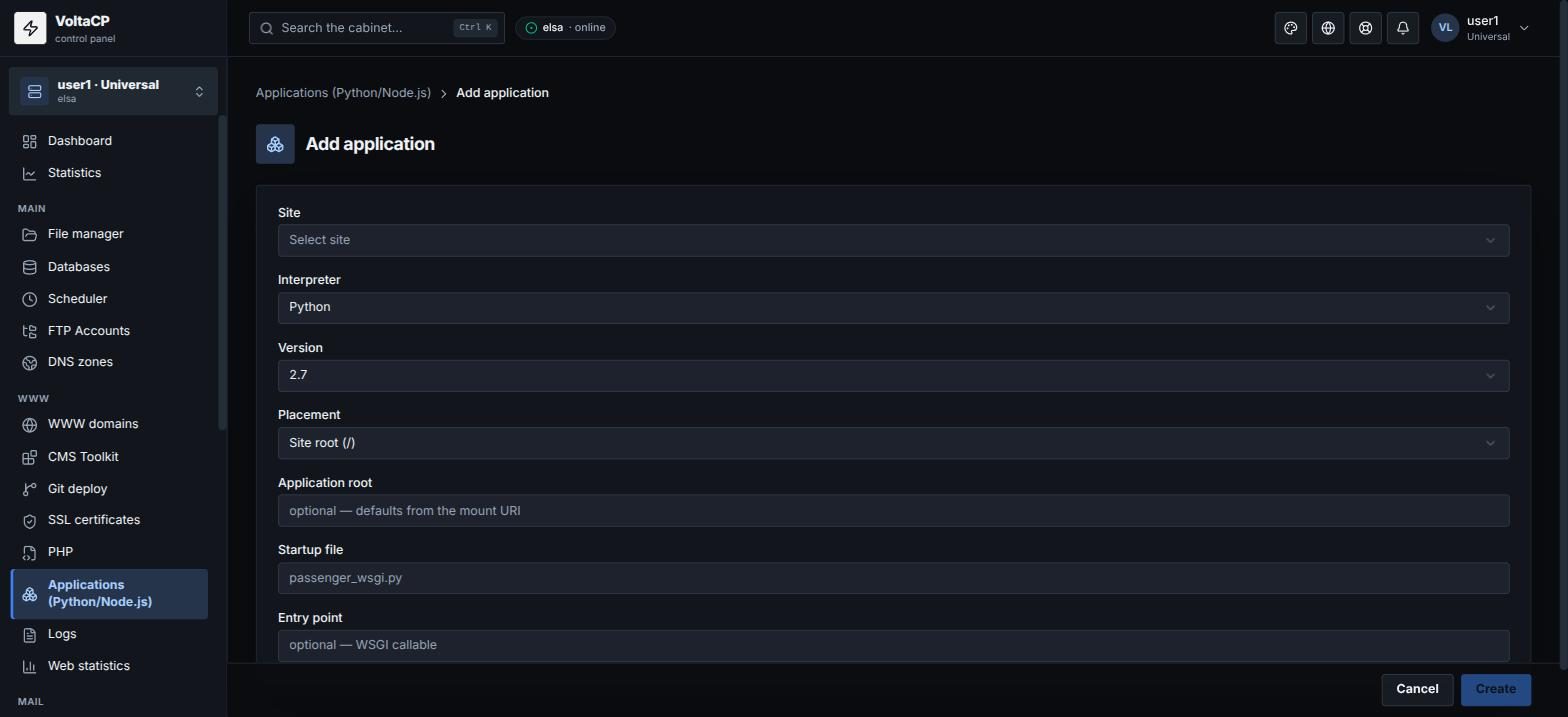
- Open "WWW" -> "Applications (Python/Node.js)" (or the "Applications" tab in the site settings).
- Click "Add application".
- Choose the "Site", the "Interpreter" (Python or Node.js) and the "Version".
- In "Placement", choose "Document root (/)" or "Subdirectory".
- If needed, enter the "Application root": where the code is (optional).
- Enter the "Startup file" (for example
passenger_wsgi.pyorapp.js). For Python, enter the "Entry point" (WSGI object) if needed. - Save.
How to install pip/npm packages
In the application settings, list the packages in "Modules", for example django or express==4.18.2.
How to set environment variables
In the application settings, fill in "Environment variables". After saving, the values are hidden.
After you change the code
Click "Restart" so the application picks up the new code. You can also change the interpreter version in the application settings.