Shared hosting
How to get a free Let's Encrypt SSL certificate?
A free Let's Encrypt certificate is issued in the control panel and renews automatically.
Option 1. From the site settings
- Open "WWW" -> "WWW domains" -> your site -> the "SSL" tab.
- Click "Issue SSL".
- Check the domains in the certificate (site aliases are added automatically), keep "Serve the site over HTTPS after issuance" checked and click "Issue".
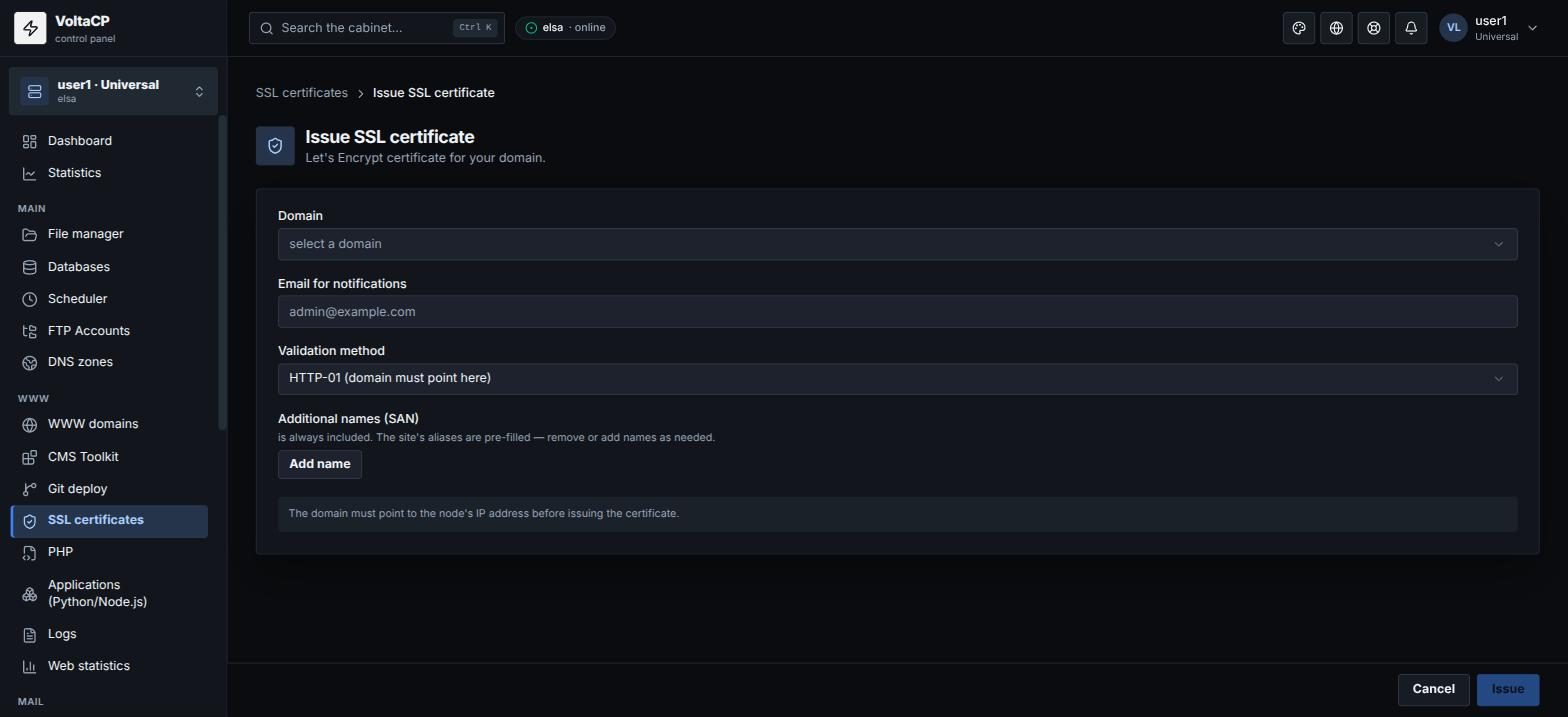
Option 2. From the certificates section
- Open "WWW" -> "SSL certificates".
- Click "Issue".
- Select the domain, the email for notifications and the validation method:
- "HTTP-01" - the domain must already point to our server;
- "DNS-01" - works through our DNS if the domain's NS are delegated to us; lets you issue a certificate before the site is switched and issue a wildcard
*.domain("Include the wildcard").
- If needed, add "Additional names (SAN)" and click "Issue".
After issuance
- Turn on "Redirect to HTTPS" on the "SSL" or "Site" tab so that all visitors go to https.
- The certificate renews automatically. You do not need to do anything.
- If the certificate is issued but the site opens only over http, check that the "Serve over HTTPS" switch is on.
If the certificate is not issued
- The domain (and every name in the certificate, for example www) must point to our server's IP. If DNS is still updating, wait or use "DNS-01" validation.
- If the domain is on Cloudflare with proxying, use "DNS-01" (with our NS) or turn off proxying for a while.