Shared hosting
How to export/import a MySQL database?
A database dump is useful for a backup, for moving a site or for restoring data. You can export and import it in three ways: in the panel, in phpMyAdmin or over SSH.
In the panel (recommended)
Export:
- Open "Main" -> "Databases".
- Select the database and click "Dump": the browser downloads the dump file.
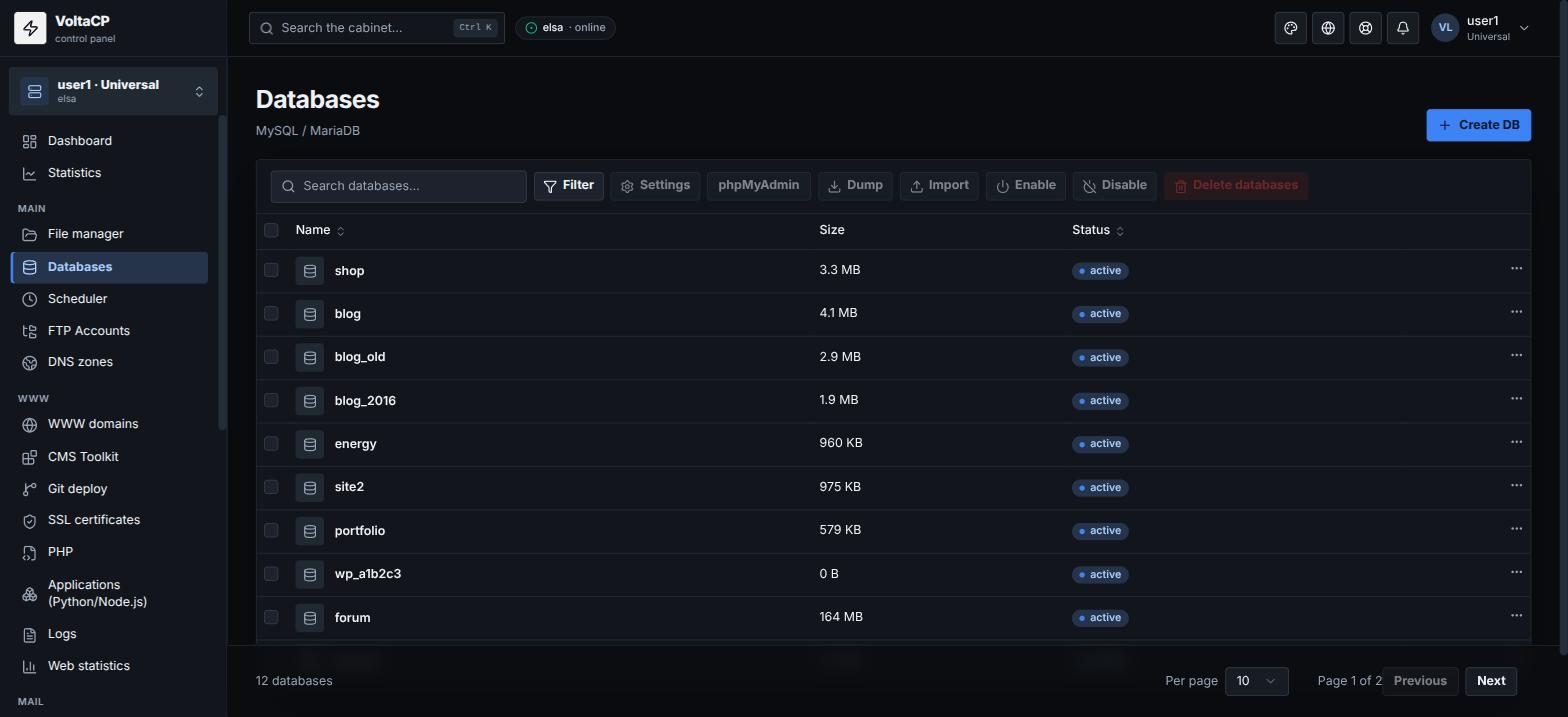
Import:
- Open "Main" -> "Databases".
- Select the database and click "Import".
- Choose a
.sqlfile or a compressed.sql.gzfile.
Import loads the data into the selected database. If the database already has tables with the same names, delete them first (for example in phpMyAdmin) or use a dump with DROP TABLE commands.
Compress large dumps to .sql.gz: the panel accepts compressed files. If a dump is over the upload limit, the panel tells you.
In phpMyAdmin
- Open phpMyAdmin (see "How to open phpMyAdmin?") and choose the database.
- Export: "Export" tab -> "Go".
- Import: "Import" tab -> choose the file -> "Go".
Over SSH
The first command saves the database to dump.sql, the second loads it back:
mysqldump -u USER -p DB_NAME > dump.sql
mysql -u USER -p DB_NAME < dump.sql
How to connect over SSH: see "How to connect via SSH".