Shared hosting
File manager: upload, archives, permissions, virus scan
"Main" -> "File manager" shows the files of your account. Site files are in the www/<domain> directory.
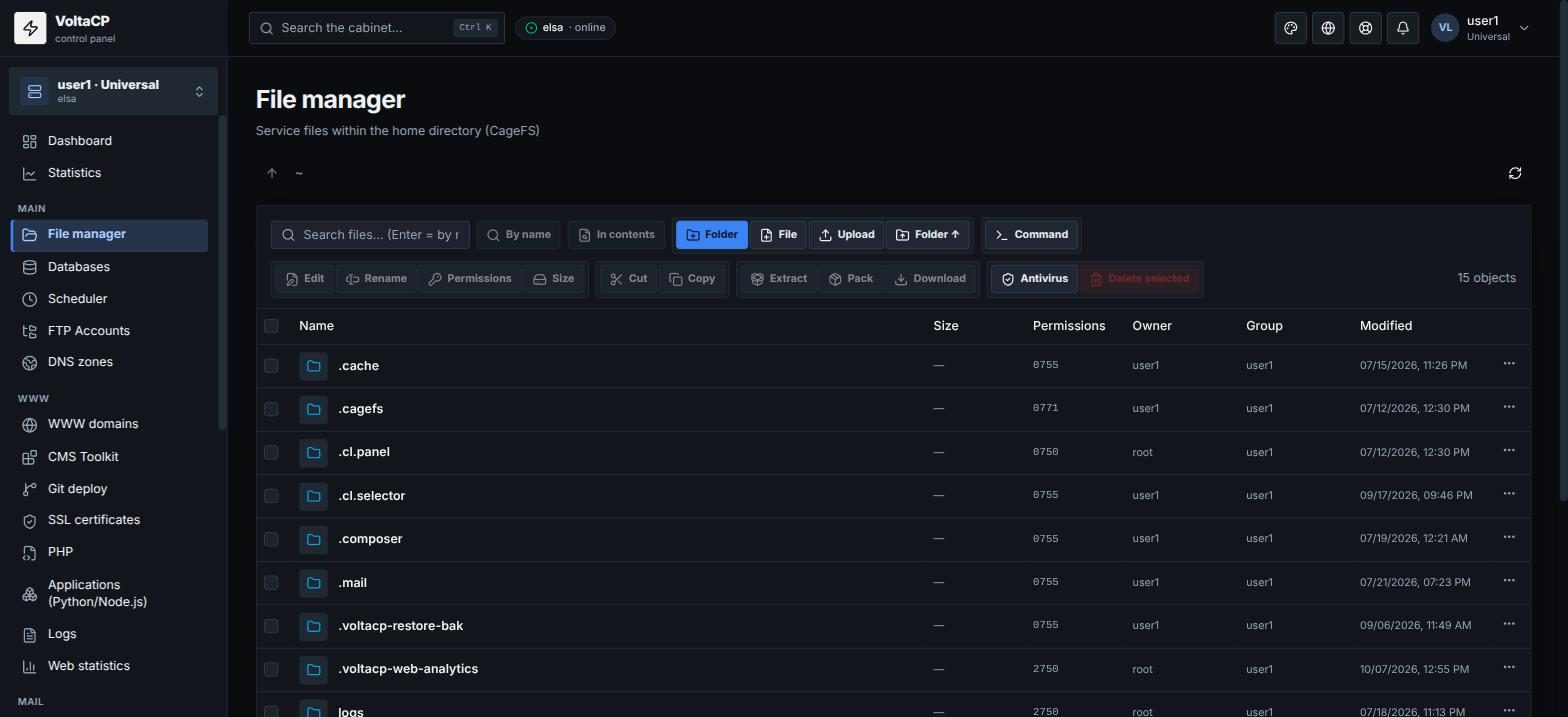
How to upload files to a site
- Open "Main" -> "File manager" and go to the
www/<domain>directory. - Click "Upload" (files) or "Folder" (a whole folder from your computer).
One file can be up to 500 MB. Upload larger files via FTP/SFTP.
How to unpack an archive
- Upload the archive to the folder you need.
- Select the archive and click "Extract": the archive is unpacked into the selected folder.
How to download a site as an archive
- Select the files or folders.
- Click "Pack": an archive is created.
- Select the archive and click "Download".
How to change permissions (chmod)
Select a file or folder and click "Permissions".
How to scan files for viruses
- Select the site files or folder.
- Click "Antivirus" and view the report.
Other features
- "Edit" opens a file in the built-in editor.
- "Size" calculates the size of a folder.
- File search: "By name" and "In contents".
- "Command" runs a command in the current folder.
Do not delete system directories of the account (logs, mod-tmp, etc.): this can break your sites.