Shared hosting
DNS zones and DNS records of a domain
"Main" -> "DNS zones" manages DNS records of domains that use our NS (ns1.globalnameservers.net, ns2.globalnameservers.org). If a domain uses third-party NS (for example Cloudflare), edit the records at that provider.
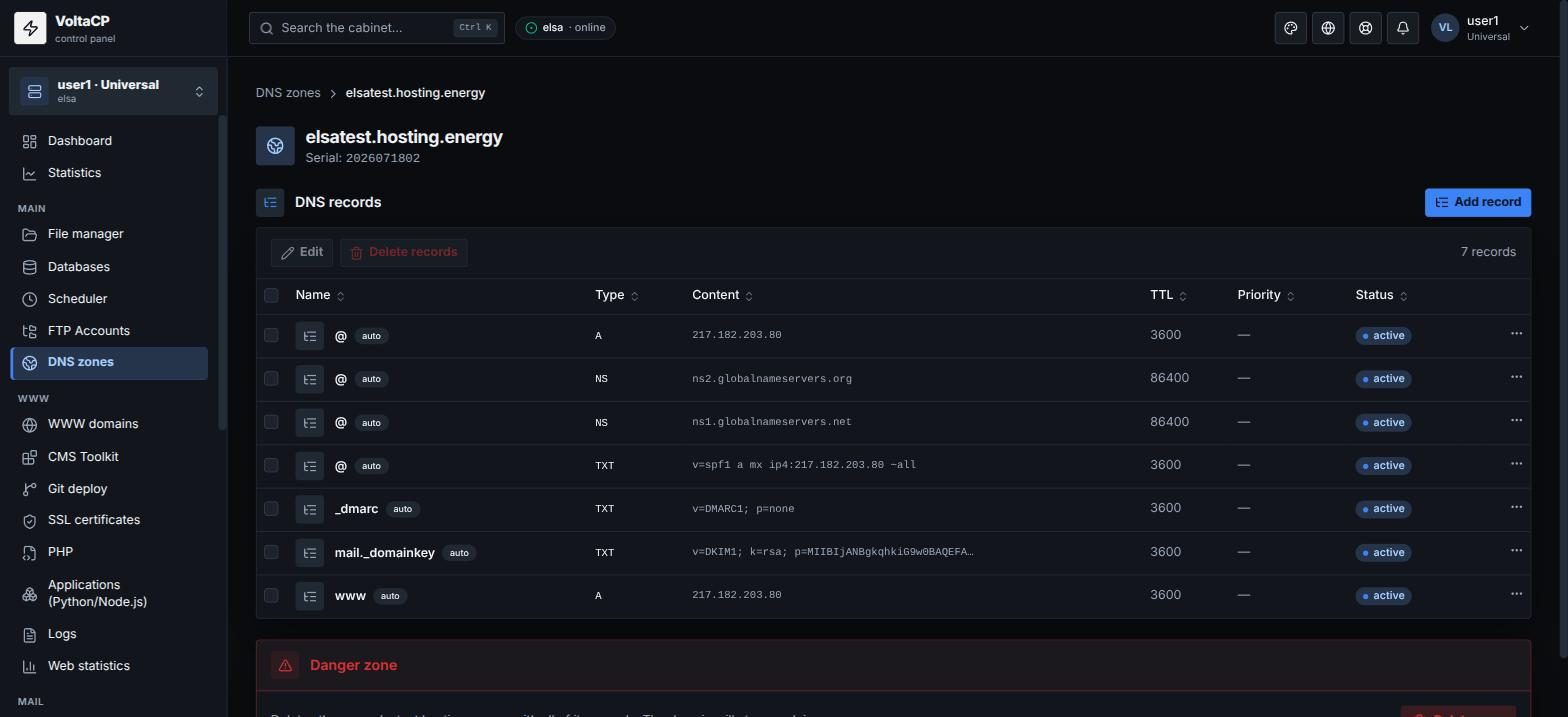
The zone is created automatically
When you create a site or a mail domain with "Create a DNS zone with records" checked, the zone and the needed records (A, MX, SPF, DKIM) are created for you. Records that the panel manages automatically are marked "auto".
How to create a zone manually
- Open "DNS zones" and click "Create zone".
- Enter the "Domain" and the "IP address" for A records.
- If needed, check "Enable DNSSEC".
- Save.
How to add or edit a record
- Open "DNS zones" and click the zone.
- Click "Add record" and enter "Name", "Type" (A, AAAA, CNAME, MX, TXT, etc.), "Content", "TTL, sec", and "Priority" for MX.
- To edit a record, select it and click "Edit". The name and type of a record cannot be changed: delete the record and create it again.
After you save, DNS changes spread across the internet in a few minutes to 24 hours.
How to enable DNSSEC
- Enable DNSSEC in the zone settings.
- Give the "DS records for delegation" from the zone card to your domain registrar.
If DNSSEC is on at the registrar and the DS records are wrong, the domain stops working.