Backups and self-service restore
On shared hosting, backups are made automatically every night and stored on separate servers.
Retention:
- databases: daily backups for the last 3 months;
- files: daily backups for the last 7 days, plus 4 weekly and 3 monthly backups.
Virtual servers (VDS) have no backups: you need to set up backups yourself.
How to restore files or a database yourself
You can restore data from these backups right in the panel, without contacting support:
- Open "Tools" -> "Restore from shared backups".
- Choose the "Files" or "Databases" tab.
- Choose the "Restore point" (the backup date).
- Files: find the file or folder and click "Restore". You can restore a single file, a folder ("Restore this folder") or the whole backup ("Restore whole backup").
- Databases: choose the database and click "Restore" or "Restore all databases".
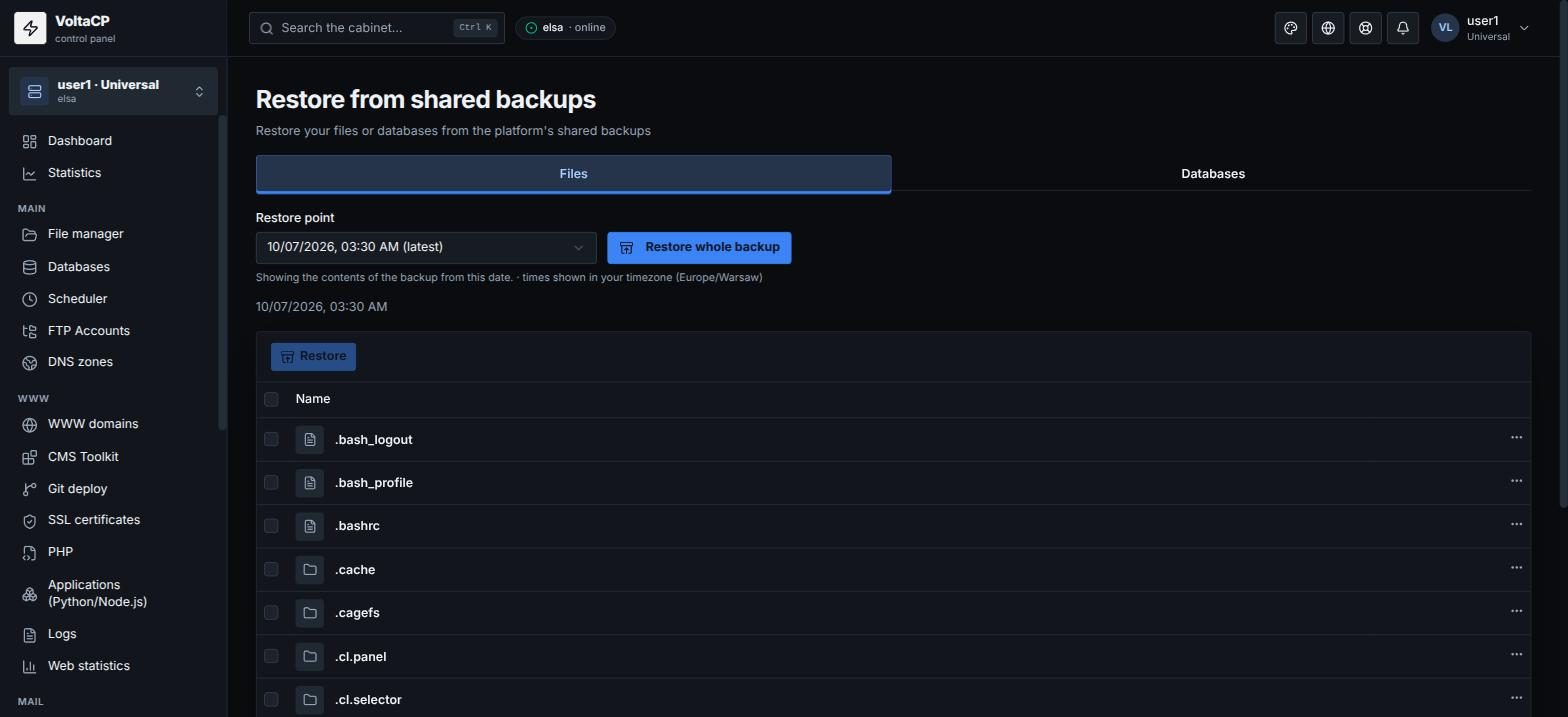
Restored items overwrite the current ones. Before overwriting, the panel saves a safety copy of the current files (or a safety dump of the database), so an accidental restore can be rolled back. Times in the list are shown in your time zone.
If the service is already deleted
If the hosting was deleted (for example after non-payment), self-service restore is not available. Order new hosting and write to technical support: we will restore sites and databases from the remaining backups within the retention period.
How to make your own backup
You can make your own backup at any time:
- files: download via FTP/SFTP or as an archive in "File manager" ("Pack" -> "Download");
- databases: the "Dump" button in "Databases";
- automatically to your own storage: see "Own backups to your storage".